Mise en place d'une Haute Disponibilité (VIP) sécurisée (SSL)
For english version, please go down.
Introduction
A présent voyons comment mettre en oeuvre une haute disponibilité avec VIP plus élaborée (et plus sécurisée), en envoyant des messages encryptés avec SSL via netcat.
Soit 2 serveurs sur le réseau 10.10.10.0/24 :
- n1 : 10.10.10.1
- n2 : 10.10.10.2
On veut une VIP sur 10.10.10.42
Voici un schéma :
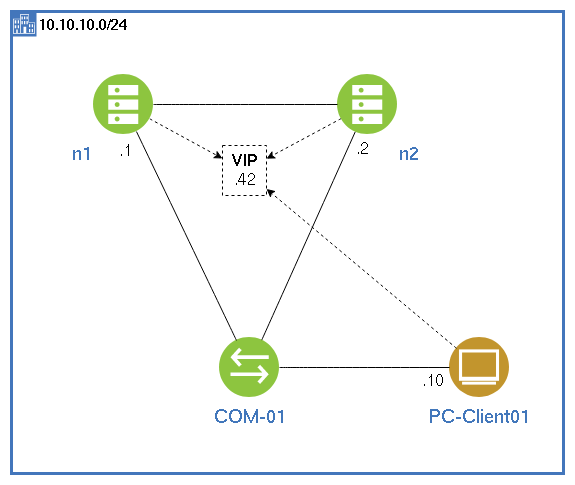
Le principe est simple, n1 sera le serveur primaire.
C'est lui qui se verra attribuer la VIP par défaut.
Il exécute un script en continu (en tâche de fond) qui envoie un message crypté à intervalle fixe (1/2 secondes) à n2.
n2 est le serveur de secours. Son but est de récupérer la VIP dans le cas où n1 viendrait à ne plus être en ligne.
n2 exécute 2 scripts en continu (en tâche de fond). L'un récupère le message encrypté, le second déclenche l'attribution de la VIP en cas de problème.
Dans les scripts suivants, on suppose que la carte réseau de vos serveurs est 'e1000g0'.
Il faudra changer le nom si vous en avez une autre ! Idem pour le port pour netcat (12345)
Ces scripts constituent une base.
En l'état actuel, je laisse les innombrables logs générés lors de l'exécution des scripts pour vous aider à débugger en cas de soucis.. Mais il faudra bien entendu les supprimer car ça pèse très vite lourd !
On peut aller beaucoup plus loin.
On peut par exemple imaginer rajouter une instance de vérification via un autre protocole (SSH par exemple) en cas de défaillance de n1, avant de basculer la VIP ou remplacer root par un utilisateur privilégié etc... Ce ne sont pas les idées qui manquent !
Grâce aux blocs à copier/coller dans la procédure, la configuration se fait en moins de 5min.
(se mettre en root tout au long de la procédure)
1) Sur n1 et n2
- Autoriser la connexion à root via SSH :
sed -i 's/PermitRootLogin no/PermitRootLogin yes/' /etc/ssh/sshd_config ; svcadm restart ssh- Installer netcat :
pkg install netcat- Créer un dossier pour les scripts de HA
mkdir /HA- Régler ntp : les 2 serveurs doivent impérativement être correctement synchronisés (à la même heure)
pkg install ntpsec && /usr/bin/ntpdate 0.fr.pool.ntp.org && date && svcadm enable svc:/network/ntp:default2) Sur n1
- Générer une clé privée
openssl genpkey -algorithm RSA -out /HA/private_key.pem- Extraire la clé publique
openssl rsa -pubout -in /HA/private_key.pem -out /HA/public_key.pem- Envoyer la clé publique sur n2 :
scp /HA/public_key.pem USER@10.10.10.2:/tmp/public_key_n1.pemRendez-vous sur n2 afin de déplacer la clef dans le dossier /HA :
mv /tmp/public_key_n1.pem /HA/Retourner sur n1.
Créer un script pour s'attribuer la VIP
(copier/coller le bloc pour créer le script et autoriser son exécution)
cat <<'EOF' > /HA/vip-up.sh
#!/bin/sh
exec 2> /dev/null
/sbin/ifconfig '$1' addif '$2' netmask 255.255.255.0 up
EOF

chmod +x /HA/vip-up.sh
Créer un script pour supprimer la VIP
(copier/coller le bloc pour créer le script et autoriser son exécution)
cat <<'EOF' > /HA/vip-down.sh
#!/bin/sh
exec 2> /dev/null
/sbin/ifconfig '$1' removeif '$2'
EOF

chmod +x /HA/vip-down.sh
Créer un script pour envoyer un 'ping' (:-D) encrypté
(copier/coller le bloc pour créer le script et autoriser son exécution)
cat <<'EOF' > /HA/send_encrypted_ping.sh
#!/bin/bash
# Message à envoyer
MESSAGE='ping'
# Créer un fichier temporaire pour le message
echo '$MESSAGE' > /HA/message.txt
# Chiffrer le message avec la clé publique de n2
openssl pkeyutl -encrypt -pubin -inkey /HA/public_key_n2.pem -in /HA/message.txt -out /HA/encrypted_ping.bin
# Envoyer le message chiffré à n2
nc 10.10.10.2 12345 < /HA/encrypted_ping.bin
EOF

chmod +x /HA/send_encrypted_ping.sh
(ici le port pour l'exemple choisi est 12345, si vous le changez ici, il faudra également le faire dans le script encrypted_ping.sh sur n2)
Créer un script pour envoyer le message encrypté à n2
(copier/coller le bloc pour créer le script et autoriser son exécution)
cat <<'EOF' > /HA/send_ping_loop.sh
#!/bin/bash
while true; do
 /HA/send_encrypted_ping.sh
 sleep 1
done
EOF

chmod +x /HA/send_ping_loop.sh
3) Sur n2
- Générer une clé privée
openssl genpkey -algorithm RSA -out /HA/private_key.pem- Extraire la clé publique
openssl rsa -pubout -in /HA/private_key.pem -out /HA/public_key.pem- Envoyer la clé publique sur n1 :
scp /HA/public_key.pem root@10.10.10.1:/tmp/public_key_n2.pemRendez-vous sur n1 pour déplacer la clef reçue dans /HA :
mv /tmp/public_key_n2.pem /HA/Puis retourner sur n2
Créer un script pour s'attribuer la VIP
(copier/coller le bloc pour créer le script et autoriser son exécution)
cat <<'EOF' > /HA/vip-up.sh
#!/bin/sh
exec 2> /dev/null
/sbin/ifconfig '$1' addif '$2' netmask 255.255.255.0 up
EOF

chmod +x /HA/vip-up.sh
Créer un script pour supprimer la VIP
(copier/coller le bloc pour créer le script et autoriser son exécution)
cat <<'EOF' > /HA/vip-down.sh
#!/bin/sh
exec 2> /dev/null
/sbin/ifconfig '$1' removeif '$2'
EOF

chmod +x /HA/vip-down.sh
Créer un script pour recevoir le 'ping' encrypté envoyé par n1
(copier/coller le bloc pour créer le script et autoriser son exécution)
cat <<'EOF' > /HA/receive_encrypted_ping.sh
#!/bin/bash
while true; do
 nc -l -p 12345 > /HA/encrypted_ping.bin
 # Déchiffrer le message avec la clé privée de n2
 DECRYPTED_MESSAGE=$(openssl pkeyutl -decrypt -inkey /HA/private_key.pem -in /HA/encrypted_ping.bin)
 # Vérifier si le message est 'ping'
 if [ '$DECRYPTED_MESSAGE' == 'ping' ]; then
 touch /HA/ping_received
 fi
done
EOF

chmod +x /HA/receive_encrypted_ping.sh
Créer le script de failover
C'est lui qui va moniter que les messages sont bien reçus entre n1 et n2 et déclencher l'attribution de la VIP sur n2 lorsque n1 ne répondra plus.
(Copier/coller le bloc pour créer le script et autoriser son exécution)
cat <<'EOF' > /HA/failover.sh
#!/bin/bash
# Initialiser la variable pour savoir si n2 a la VIP
n2_has_vip=false

# Fonction pour vérifier si le fichier de ping_received existe
check_ping_received() {
 if [ -f /HA/ping_received ]; then
 rm /HA/ping_received
 return 0
 else
 return 1
 fi
}

# Boucle permettant de monitorer la connexion à n1
while true; do
 if check_ping_received; then
 if $n2_has_vip; then
 /HA/vip-down.sh e1000g0 10.10.10.42
 n2_has_vip=false
 fi
 else
 if ! $n2_has_vip; then
 /HA/vip-up.sh e1000g0 10.10.10.42
 n2_has_vip=true
 fi
 fi
 sleep 1 # Ajustez l'intervalle de vérification à vos besoins
done
EOF

chmod +x /HA/failover.sh
4) Sur n1 et n2 : réaliser un test de fonctionnement des scripts
- Tester l'attribution de la VIP :
/HA/vip-up.sh e1000g0 10.10.10.42 ; sleep 5 ; ipadm- Tester la suppression de la VIP
/HA/vip-down.sh e1000g0 10.10.10.42 ; ipadmSi les 2 scripts fonctionnent bien sur chaque serveur, alors on passe à la suite.
5) Le moment de vérité : la mise en place du dispositif de HA !
- Attribuer la VIP à n1 : on désigne ainsi n1 comme le serveur primaire, celui qui possède la VIP
/HA/vip-up.sh e1000g0 10.10.10.42 ; sleep 5 ; ipadm- Sur n1, commencer l'envoi des 'ping' encryptés :
nohup /HA/send_ping_loop.sh &- Sur n2, exécuter les scripts suivants :
nohup /HA/failover.sh &
nohup /HA/receive_encrypted_ping.sh &
Notez les numéros de PID de chaque script pour pouvoir les arrêter plus facilement en cas de soucis.
Le système est à présent en place.
Si vous arrêter le serveur n1, vous observerez que n2 prend instantanément la VIP !
Le délai d'envoi d'1 seconde (/HA/send_ping_loop.sh) et celui d'analyse (/HA/failover.sh) d'1 seconde aussi permettent d'éviter une surconsommation de ressources des processeurs des serveurs.
Le système consomme entre 2 et 3% de CPU avec 1 seconde.
On peut descender à 0.5 seconde, moyennant une augmentation de 4-5% d'usage du CPU.. Mais en dessous de 0.5 secondes, la consommation devient exponentielle et est donc à éviter !
Améliorer la sécurité
Afin d'améliorer la sécurité de ce dispositif, voici quelques pistes :
- limiter le dispositif à des interfaces réseaux spécifiques à ce dispositif (les interfaces entre n1 et n2 uniquement)
- bien configurer le pare-feu des 2 serveurs pour ne rien autoriser d'autre que le passage de ces messages sur les interfaces dévolues.
- vérifier les permissions d'accès aux clefs openssl
- ajouter des logs aux scripts pour faciliter le diagnostic
- effectuez une sauvegarde externe des clefs SSL
ENGLISH VERSION
Introduction
This procedure was created because I was unable to configure VRRP on OmniOSce/OpenIndiana.
(I am still looking for a way to make VRRP work on those systems, so if anyone knows how to do it, it would be great).
Therefore, I decided to write a simple secured method to transfer a VIP (Virtual IP) from one server to another.
There are two servers running on OmniOSce or OpenIndiana.
One of them is the primary server (n1 : 10.10.10.1) and holds a virtual IP address (10.10.10.42), while the other (n2 : 10.10.10.2) stays on standby.
If n1 suddenly stops functioning, then n2 must instantly take over the VIP.
The process is simple: n1 sends an encoded message using OpenSSL to n2 (which requires an exchange of public keys between the two servers). n2 decrypts the message and ensures that it is the correct message.
As soon as n1 stops sending the message, n2 takes over the VIP.
(Be root for all the procedure)
1) On n1 and n2
- Install netcat :
pkg install netcatCreate a folder for the scripts :
mkdir /HA
Configure NTP: the two servers must be correctly synchronized (at the same time).
Here it's a configuration for French time :
pkg install ntpsec && /usr/bin/ntpdate 0.fr.pool.ntp.org && date && svcadm enable svc:/network/ntp:default2) On n1
- Generate a private key
openssl genpkey -algorithm RSA -out /HA/private_key.pemExtract the public key
openssl rsa -pubout -in /HA/private_key.pem -out /HA/public_key.pemSend the public key to n2 :
scp /HA/public_key.pem USER@10.10.10.2:/tmp/public_key_n1.pemGo to n2 (or connect to n2 via SSH :
ssh USER@10.10.10.2Then, when on n2, use sudo or become root and just move the key to /HA/ and go back to /HA/ folder.
mv /tmp/public_key_n1.pem /HA/- Then go back to n1.
Create a script to assign the VIP
(copy/paste the block to create the script and allow its execution)
cat <<'EOF' > /HA/vip-up.sh
#! /bin/sh
exec 2> /dev/null
/sbin/ifconfig "$1" addif "$2" netmask 255.255.255.0 up
EOF

chmod +x /HA/vip-up.sh
Create a script to remove the VIP
(copy/paste the block to create the script and allow its execution)
cat <<'EOF' > /HA/vip-down.sh
#! /bin/sh
exec 2> /dev/null
/sbin/ifconfig "$1" removeif "$2"
EOF

chmod +x /HA/vip-down.sh
Create a script to send an encrypted 'ping' message (:-D) (or whatever you want !)
(copy/paste the block to create the script and allow its execution)
cat <<'EOF' > /HA/receive_encrypted_ping.sh
#!/bin/bash
while true; do
 nc -l -p 12345 > /HA/encrypted_ping.bin
 # Decrypt the message with the private key of n2
 DECRYPTED_MESSAGE=$(openssl pkeyutl -decrypt -inkey /HA/private_key.pem -in /HA/encrypted_ping.bin)
 # Verify if the message is "ping"
 if [ "$DECRYPTED_MESSAGE" == "ping" ]; then
 touch /HA/ping_received
 fi
done
EOF

chmod +x /HA/receive_encrypted_ping.sh
Create a script to send the encrypted message to n2
(copy/paste the block to create the script and allow its execution)
cat <<'EOF' > /HA/send_ping_loop.sh
#!/bin/bash

while true; do
 /HA/send_encrypted_ping.sh
 sleep 1
done
EOF

chmod +x /HA/send_ping_loop.sh
3) On n2
- Generate a private key
openssl genpkey -algorithm RSA -out /HA/private_key.pemExtract the public key
openssl rsa -pubout -in /HA/private_key.pem -out /HA/public_key.pemSend the public key to n1 :
scp /HA/public_key.pem USER@10.10.10.1:/tmp/public_key_n2.pemGo to n1 (or connect to n1 via SSH :
ssh USER@10.10.10.1Then, when on n1, use sudo or become root and just move the key to /HA/ and go back to /HA/ folder.
mv /tmp/public_key_n2.pem /HA/Then go back to n2.
Create a script to assign the VIP
(copy/paste the block to create the script and allow its execution)
cat <<'EOF' > /HA/vip-up.sh
#! /bin/sh
exec 2> /dev/null
/sbin/ifconfig "$1" addif "$2" netmask 255.255.255.0 up
EOF

chmod +x /HA/vip-up.sh
Create a script to remove the VIP
(copy/paste the block to create the script and allow its execution)
cat <<'EOF' > /HA/vip-down.sh
#! /bin/sh
exec 2> /dev/null
/sbin/ifconfig "$1" removeif "$2"
EOF

chmod +x /HA/vip-down.sh
Create a script to receive the encrypted "ping" sent by n1
(copy/paste the block to create the script and allow its execution)
cat <<'EOF' > /HA/receive_encrypted_ping.sh
#!/bin/bash
while true; do
 nc -l -p 12345 > /HA/encrypted_ping.bin
 # Decrypt the message with the private key of n2
 DECRYPTED_MESSAGE=$(openssl pkeyutl -decrypt -inkey /HA/private_key.pem -in /HA/encrypted_ping.bin)
 # Verify if the message is "ping"
 if [ "$DECRYPTED_MESSAGE" == "ping" ]; then
 touch /HA/ping_received
 fi
done
EOF

chmod +x /HA/receive_encrypted_ping.sh
Create the failover script
This script will monitor that messages are being received correctly between n1 and n2 and trigger the assignment of the VIP to n2 when n1 no longer responds.
(Copy/paste the block to create the script and allow its execution)
cat <<'EOF' > /HA/failover.sh
#!/bin/bash
# Initialize the variable to know if n2 has the VIP.
n2_has_vip=false

# Function to check if the ping_received file exists.
check_ping_received() {
 if [ -f /HA/ping_received ]; then
 rm /HA/ping_received
 return 0
 else
 return 1
 fi
}

# Loop to monitor the connection to n1.
while true; do
 if check_ping_received; then
 if $n2_has_vip; then
 /HA/vip-down.sh e1000g0 10.10.10.42
 n2_has_vip=false
 fi
 else
 if ! $n2_has_vip; then
 /HA/vip-up.sh e1000g0 10.10.10.42
 n2_has_vip=true
 fi
 fi
 sleep 1 # Adjust the check interval to your needs.
done
EOF

chmod +x /HA/failover.sh
4) On n1 and n2: perform a functionality test of the scripts
- Test the assignment of the VIP:
/HA/vip-up.sh e1000g0 10.10.10.42 ; ipadmTest the removal of the VIP.
/HA/vip-down.sh e1000g0 10.10.10.42 ; ipadmIf both scripts work well on each server, then we're ready !
5) Start the High Availability process
- On n1, Assign the VIP : this designates n1 as the primary server, the one that holds the VIP.
/HA/vip-up.sh e1000g0 10.10.10.42 ; ipadmOn n1, start sending the encrypted "pings":
nohup /HA/send_ping_loop.sh &On n2, start the receiving and the failover scripts.
nohup /HA/failover.sh &
nohup /HA/receive_encrypted_ping.sh &
The system is now in place.
If you stop the n1 server, you will observe that n2 instantly takes over the VIP.
It's basic, but it works very well.
You can reduce the interval to 0.5 seconds, but it increases CPU usage.
However, below 0.5 seconds, the consumption becomes exponential.
↑ Haut de page